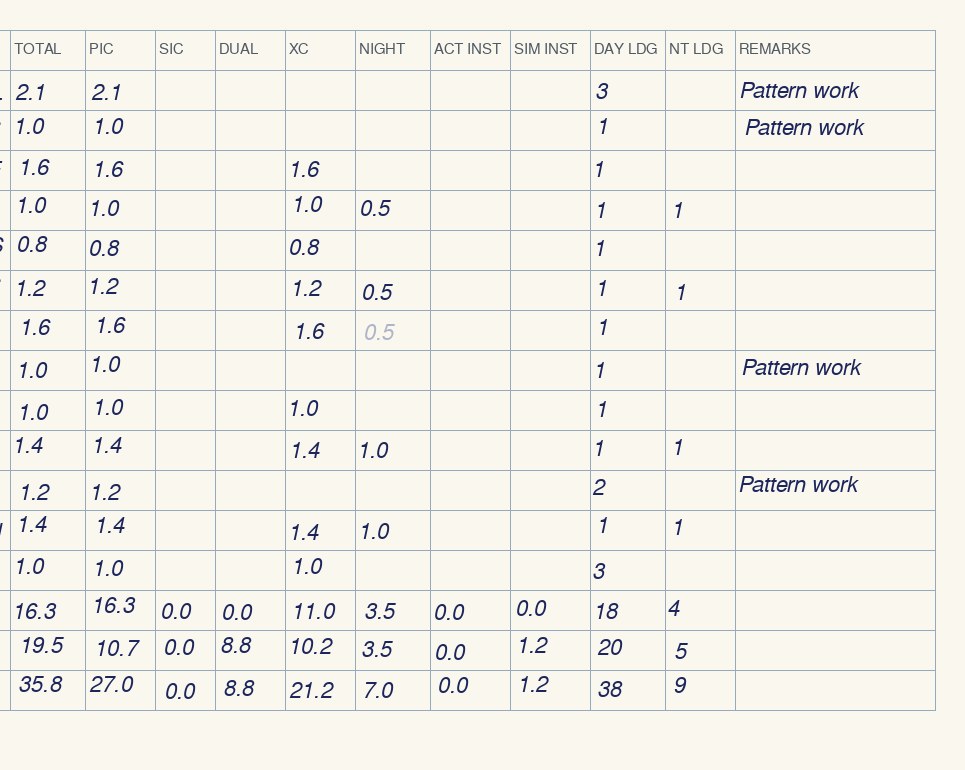
The arithmetic you'd do by hand, on every page.
- Σ entries = page total
- forwarded + page = total to date
- forwarded = previous page to date
Anything that doesn't add up is flagged with the line most likely responsible, for you to confirm against the paper. A page that balances is strong evidence the digital copy matches it.
How it works
I.
Photograph
Flat, in focus, totals rows in frame. Share the photos with your AI assistant, in order.
II.
Reconcile
Every column of every page is checked, and the carry-forward is followed through the whole logbook.
III.
Import
Correct what's flagged, then save the ForeFlight import file. Your paper logbook stays the record.
Pricing
No subscription. Pay once for the pages you need. Nothing renews, so there's nothing to cancel.
100-page pass
$24
One payment, 100 pages, valid 31 days. Covers two full standard logbooks with room to spare. It doesn't renew.
1,000-page pass
$49
One payment, 1,000 pages, valid 90 days. For long careers and multiple books. It doesn't renew.
Buying takes three steps: sign in with Google (so your pages land on your account), pay on Stripe, then connect InkToLog to your AI assistant. The pass period starts at purchase.
Questions
What counts as a page?
One logbook spread: the flight lines that run across the left and right sides, with that page's totals rows. A standard pilot logbook holds about 13 flights per page. Checking a page again, with or without corrections, is free for 120 days. Passes stack if you need more pages.
What do I need?
An AI assistant that can read photos and add custom connectors, and a Google account to sign in to InkToLog. Setup takes about a minute: see the connector page.
Do you see my photos?
No. The photos stay in your conversation with your assistant. InkToLog receives only the transcribed entries it needs to check (dates, aircraft, airports, times, remarks), processes them, and doesn't store them. Leave certificate numbers and signatures out; there's no field for them. Details on the privacy page.
Which logbook apps does it work with?
The import file is in ForeFlight's logbook import format. The reconciliation report works for any logbook, whatever app you move to.
Is a digital logbook acceptable to the FAA or my employer?
That depends on the rules that apply to you. InkToLog converts records; it doesn't certify them. Keep your paper logbook, and confirm requirements with your examiner or employer.
What about endorsements and signatures?
They stay in your paper logbook. InkToLog handles flight entries and totals.
Rather send us the photos?
A done-for-you conversion service is coming. Leave your email and we'll tell you when it opens. We'll use it for that and nothing else.